 01825 818572
A recently updated Veeam B&R console install then produced a rather annoying pop-up every time it was launched.
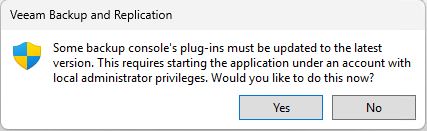
Clicking Yes in the dialogue allowed the program to run, but seemingly did nothing as it reappeared next time. This appears to have been happening to various Veeam versions for some time, and the "solution" remains the same:
Open Registry Editor as an administrator and navigate to:
HKEY_LOCAL_MACHINE\SOFTWARE\Veeam\Veeam Backup and Replication
Find the "Plugins" Subkey and right-click on it.
Click on "Permissions"
In the window that opens, please ensure that the "Read" permission is enabled for "Authenticated Users".
If this permission is not present, please add it.
Once added, close the windows and close the Veeam Server UI and then reopen it.
The window warning about available updates should no longer appear.
